Fun Things I’ve Worked On
A collection of personal and professional projects.
Roluna
A swipe-to-discover job-search app for iOS — set the role you want, then swipe through real postings one card at a time. Right swipe saves, left swipe passes, and saved roles get their own tab with apply tracking. Built solo with React Native + Expo on a Node + MongoDB backend, and currently live on TestFlight.
Roluna
Overview
Roluna reframes the job hunt as a swipe deck. Users sign in, set a target role with optional filters (location, distance, job type, salary range), and swipe through live job listings rendered as cards — right to save, left to pass. Saved listings live on their own tab where they can be marked as applied, and tapping a saved row opens the original posting on the source site.
Mental model: search results, rendered as a Swipe deck, with persistent Saved and Applied state.
It’s a full-stack solo build: a Node/Express backend serving a cache of real job listings, and a React Native iOS client with a hand-built, gesture-driven swipe deck.
Architecture
The backend uses a cache-first deck strategy. A scheduled job ingests listings from the Adzuna API into a shared MongoDB collection twice a day; user searches then hit that cache the vast majority of the time, with an on-demand API fallback for long-tail queries. This decouples user activity from the API’s daily quota and keeps the whole system comfortably inside a free tier.
| Layer | Choice |
|---|---|
| Mobile | React Native + Expo (managed), TypeScript strict |
| Navigation | Expo Router (file-based) |
| Server state | React Query (TanStack) |
| Auth | Firebase Auth — email/password + native Apple & Google Sign In |
| Gestures / animation | react-native-gesture-handler + react-native-reanimated |
| Backend | Node + Express + TypeScript |
| Database | MongoDB Atlas |
| Cache / queues | Upstash Redis |
| Listings | Adzuna API (US) |
| Validation | Zod schemas shared between client and server |
| Hosting / CI | Render (push-to-deploy) + GitHub Actions |
| Distribution | Expo EAS Build → TestFlight |
Key Design Decisions
Cache-first, quota-aware — Twice-daily bulk ingestion populates a shared listings cache, so most user searches never touch the live API; an on-demand fallback handles rare queries. This single decision is what makes a free-tier listings quota viable for an MVP.
Per-user state that survives the purge — Saved listings denormalise a snapshot of the job at save time, so a saved role stays intact even after the rolling 14-day cache cleanup removes the original posting. Dismissed jobs auto-expire via a database TTL index.
Shared validation contract — One set of Zod schemas (job types, search inputs with a salaryMax ≥ salaryMin refinement, swipe payloads) is shared across client and server through a monorepo workspace, so the two sides can’t drift out of sync.
Auth bridge — Firebase handles identity; the backend mints its own user record keyed by the Firebase UID and verifies the token on every request, bridging Firebase Auth to server-side data ownership.
The App
 Production iOS app icon — a warm clay r on the brand gradient.
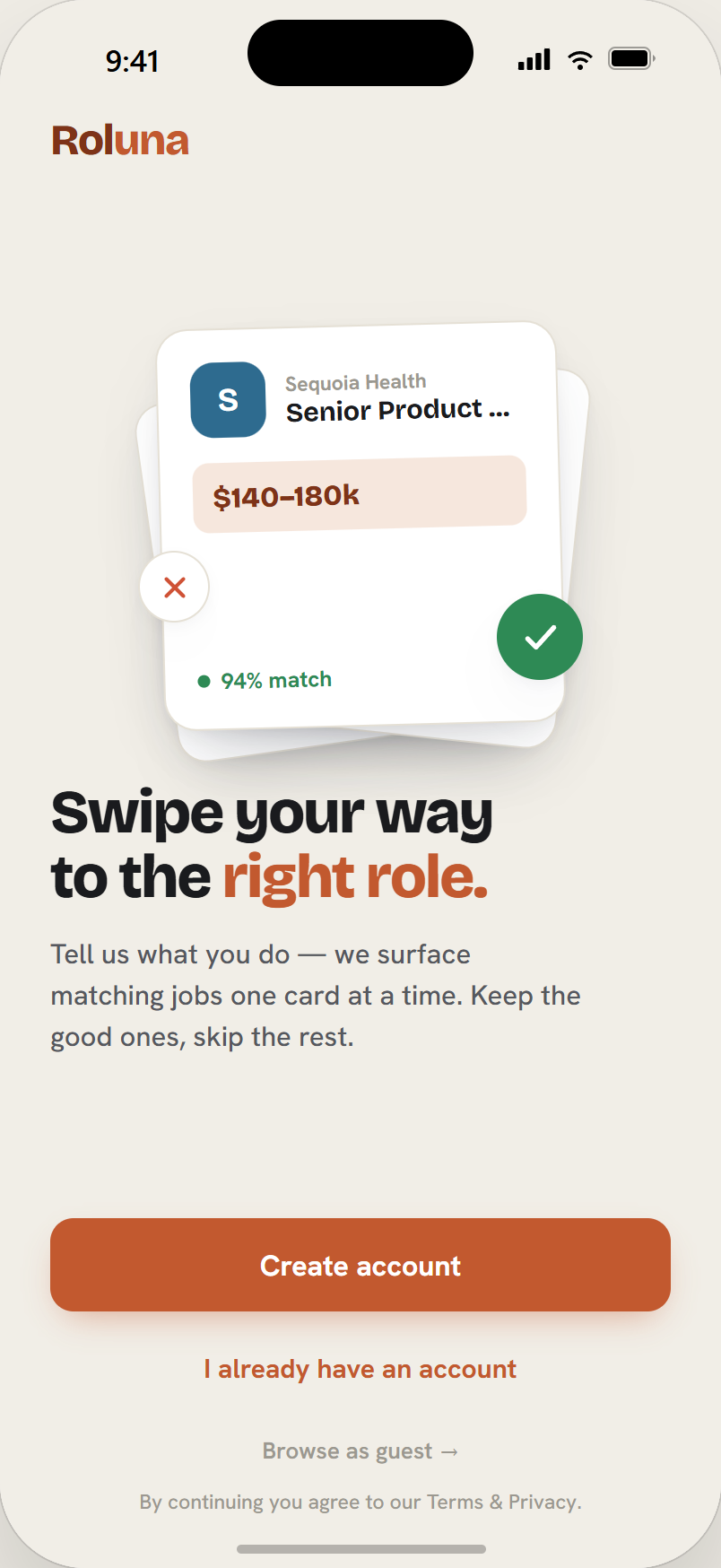
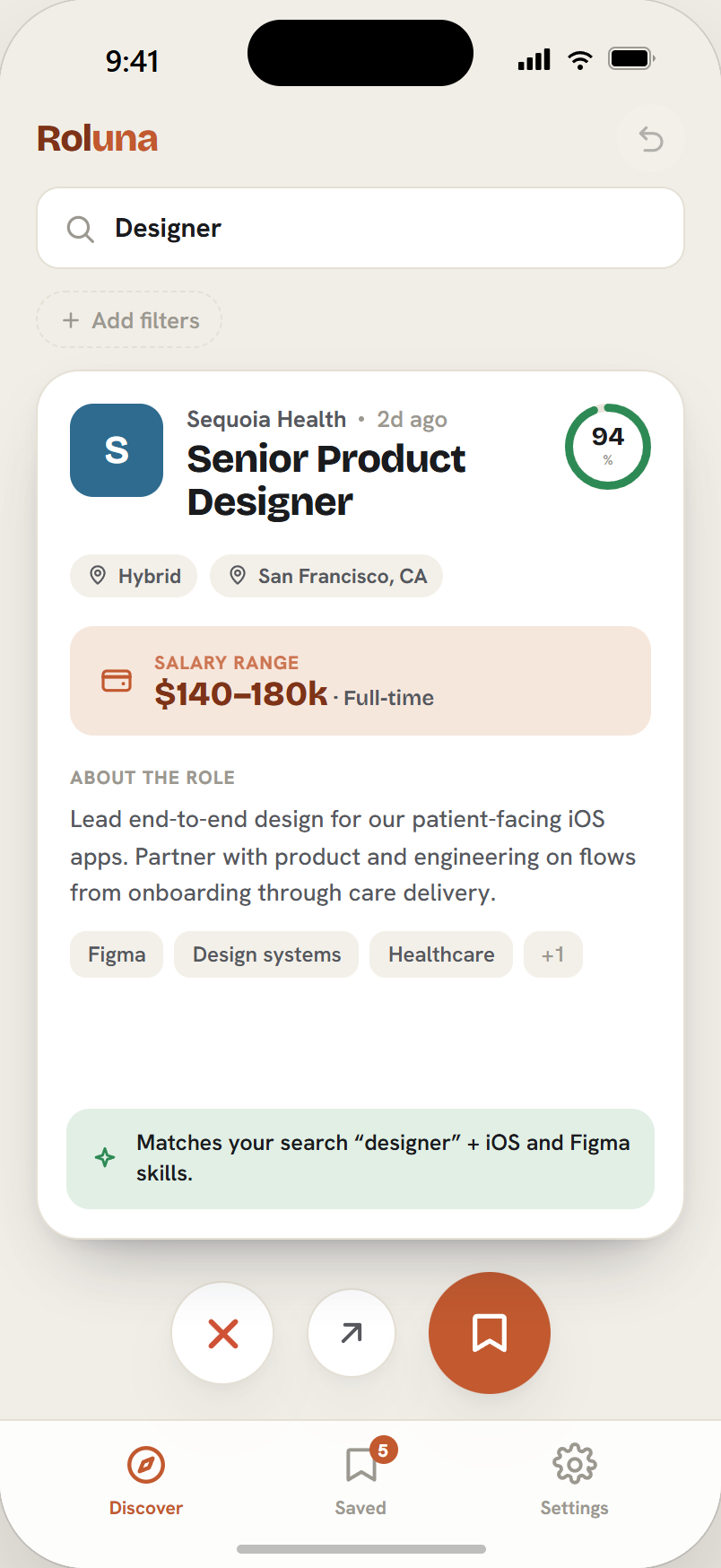
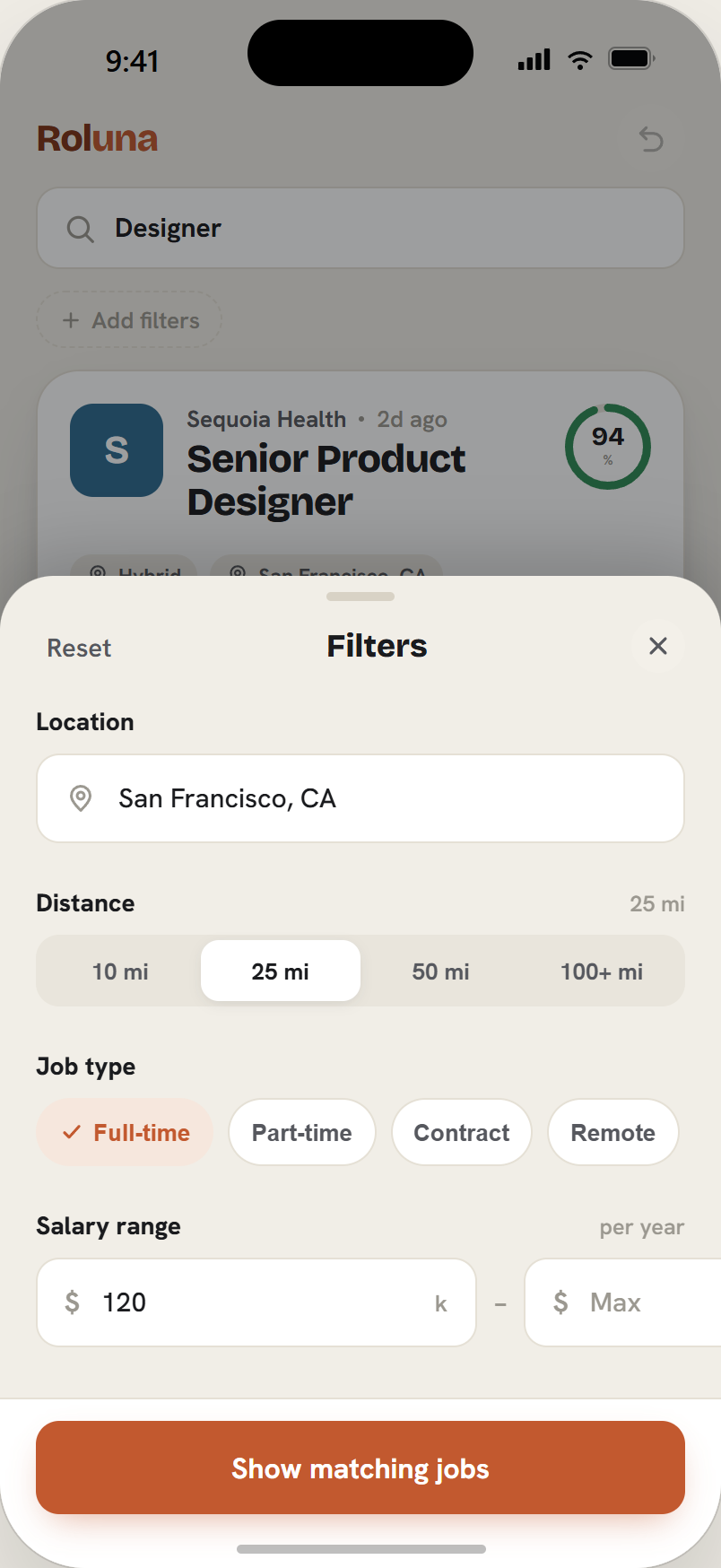
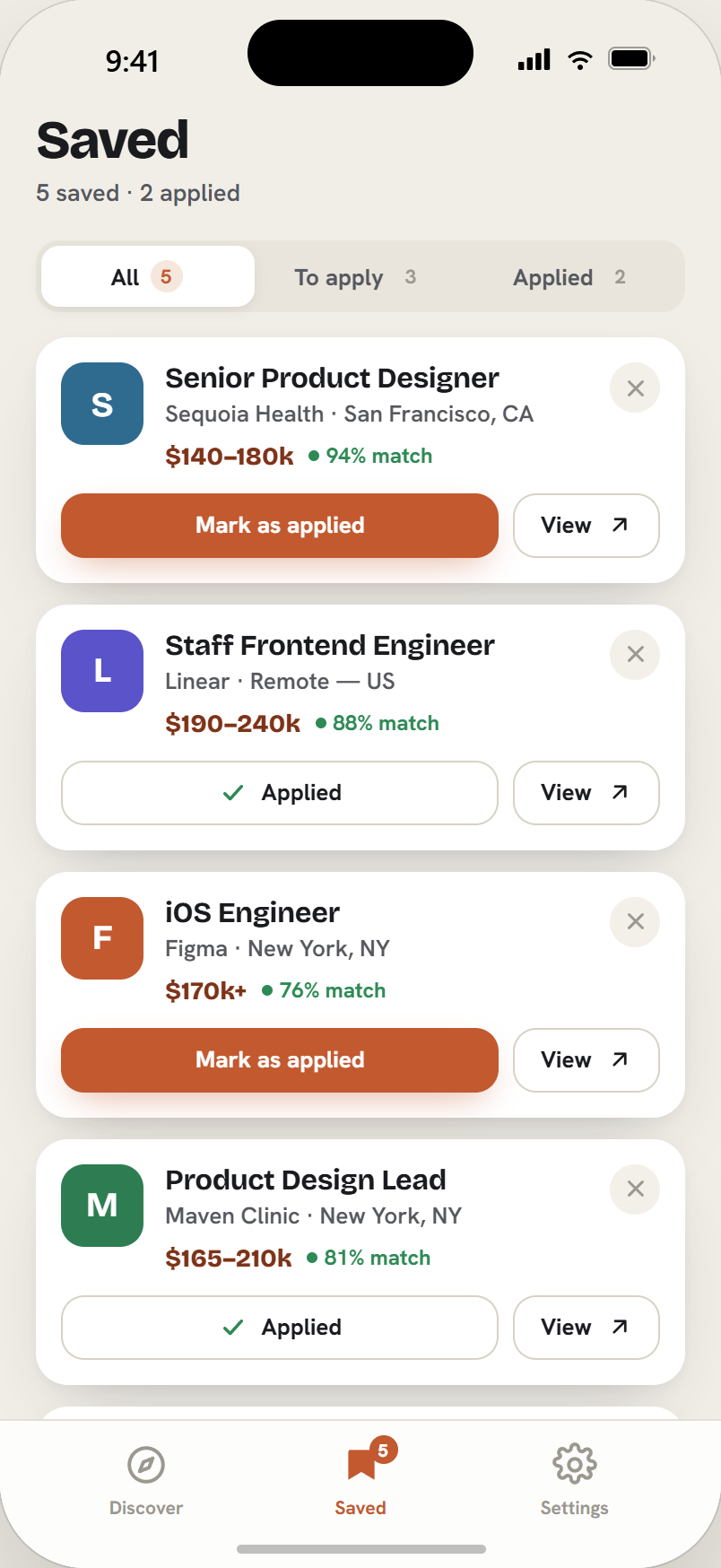
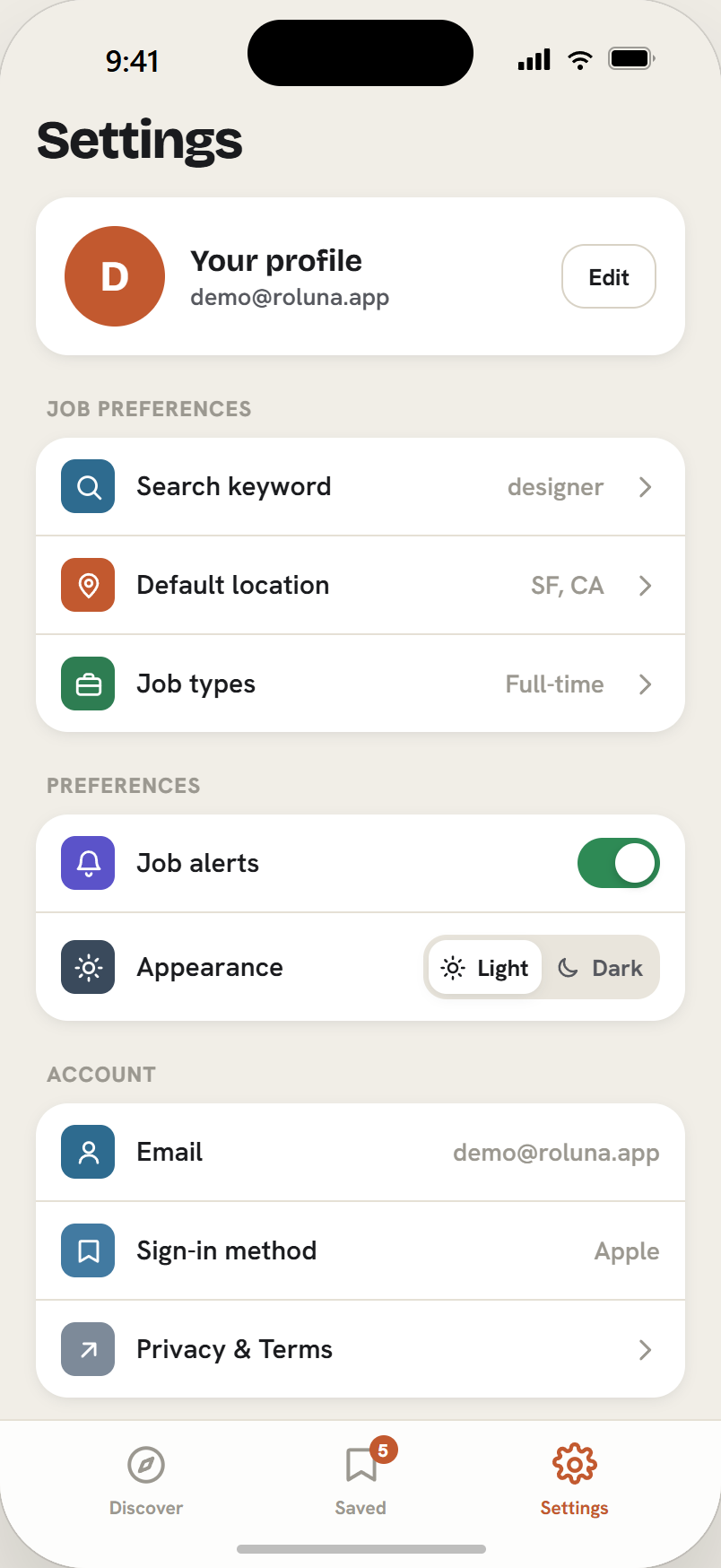
High-fidelity UI · Clay theme · designed in-prototype, captured at iOS 402×874
- Discover — A search bar opens a full-screen modal with role autocomplete (~180 roles, fuzzy-matched client-side). A filter rail shows every active filter. The centrepiece is a custom swipe deck built on Reanimated gestures, with animated SAVE/PASS stamps that fade in as you drag and a multi-level undo that survives across the session.
- Filters — A half-sheet with location autocomplete (~190 US cities), a stepped distance slider, multi-select job-type chips, a min/max salary range with validation, and date-posted controls.
- Saved — An animated segmented control switches between All / To apply / Applied. Each row can be marked as applied or opened on the source site, with a remove confirmation.
- Settings — Editable defaults for Role, Location, and Job types persisted on-device, plus account management and Apple-compliant account deletion.
- Smart defaults — User defaults are stored locally; on a cold start the app auto-seeds Discover from them, and the first manual search of a session takes over.
Engineering Challenges
| Hurdle | Resolution |
|---|---|
| Dev build launched to a blank white screen | An SDK-version mismatch — a dependency installed for a newer Expo SDK called native APIs that didn’t exist in the pinned React Native version. Pinned every native dep to its SDK-matched version and reinstalled clean. |
Unable to find a specification for 'EXDevLauncher' | In an npm-workspaces monorepo, Expo’s iOS autolinker doesn’t recurse into nested node_modules. Hoisted the transitive native modules by declaring them explicitly in the leaf workspace. |
| New searches kept showing stale cards | The deck only reloaded when empty, so a fresh search left the old cards in place. Tracked the previous query hash in a ref and split the logic into a query-change effect and a top-up effect. |
ITMS-90725 rejection at submit | Apple’s iOS 26 SDK gate flipped to enforced mid-submission. Switched the cloud build worker to the latest macOS/Xcode image — a one-line fix that satisfied the gate even on the older Expo SDK. |
Stack
React Native · Expo · Expo Router · TypeScript · React Query · Firebase Auth · Reanimated · Node · Express · MongoDB · Redis · Zod · Adzuna API · Render · GitHub Actions · EAS Build · TestFlight
Status
The backend and mobile app are complete and run end-to-end on a production TestFlight build. Remaining work is the App Store submission itself — privacy policy, listing metadata, screenshots, and review. The project was built and is run entirely on free tiers, with the Apple Developer Program as the only fixed cost.
Azure Firewall Migration
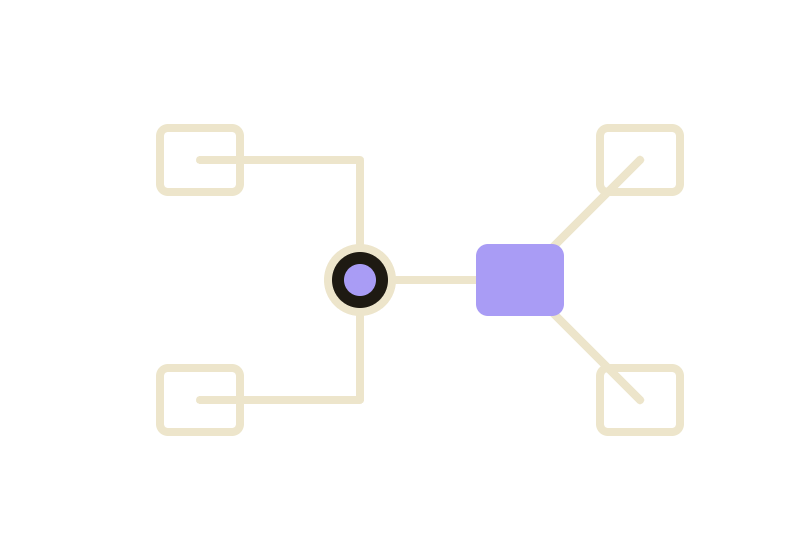
Redesigned an enterprise hub-and-spoke firewall architecture in Azure — migrating from a 2-node Active-Passive PAN-OS cluster across 4 network zones to a 3-node Active-Active-Active cluster behind an Azure Internal Load Balancer with a unified 2-zone model.
Azure Firewall Migration
Overview
A network infrastructure project modernising a production Azure NETHUB environment. The existing design used two PAN-OS firewalls in an Active-Passive HA pair with four discrete network zones (Outside, DMZ, Inside, Partners) and per-zone floating IPs as next hops for all spoke VNETs. The new design replaces this with three PAN-OS firewalls running Active-Active-Active behind an Azure Standard Internal Load Balancer, collapsing to two zones and a single ILB next-hop IP for every spoke.
WAF
float IP
float IP
float IP
float IP
→ DMZ float
→ Inside float
→ Partners float
WAF
NEW
→ ILB IP
→ ILB IP
→ ILB IP
Architecture Changes
| Area | Current | New |
|---|---|---|
| Firewall HA model | 2-node, Active-Passive | 3-node, Active-Active-Active behind Azure ILB |
| Zone model | 4 zones: Outside, DMZ, Inside, Partners | 2 zones: Outside, Inside |
| Spoke next hop | Per-zone floating IPs (3 distinct hops) | Single Azure ILB frontend IP |
| Internet egress | Via firewall policy / outside interface | Azure NAT Gateway on Outside subnet |
| On-premises path | ExpressRoute → NETHUB-Prem floating IP | ExpressRoute → Gateway Subnet (unchanged) |
| Firewall policy | Panorama 4-zone template stack | New Panorama 2-zone template stack |
Unchanged: Gateway Subnet, ExpressRoute circuits (×2 via Equinix Cloud Exchange), VNet peerings, Application Gateway (WAF).
Key Design Decisions
Azure ILB with HA Ports — The ILB load balancing rule uses HA Ports (protocol: All, port: 0), which is what ensures 5-tuple flow symmetry for stateful inspection. Return traffic for a session always hits the same firewall that handled the forward flow. Standard per-port LB rules are not sufficient for a stateful firewall behind an ILB.
Azure NAT Gateway — Attached to the Outside subnet, NAT Gateway handles outbound internet SNAT at the Azure SDN layer for all three firewall outside interfaces. PAN-OS source NAT rules for internet-bound traffic are removed to prevent double-NAT.
Zone consolidation — The DMZ, Partners, and On-Prem zones are absorbed into a single Inside zone. All spoke VNETs regardless of their former zone classification now share one route table next-hop entry pointing to the ILB frontend IP, simplifying long-term route management from three maintenance surfaces to one.
Stack
PAN-OS · Panorama · Azure Virtual Network · Azure Internal Load Balancer · Azure NAT Gateway · ExpressRoute · Azure Route Tables · Bitbucket
ServiceNow Data Pipeline
End-to-end data pipeline extracting ServiceNow ITSM records through AWS managed services, transforming via DBT, and delivering live Power BI dashboards — built on a medallion architecture.
ServiceNow Data Pipeline
Overview
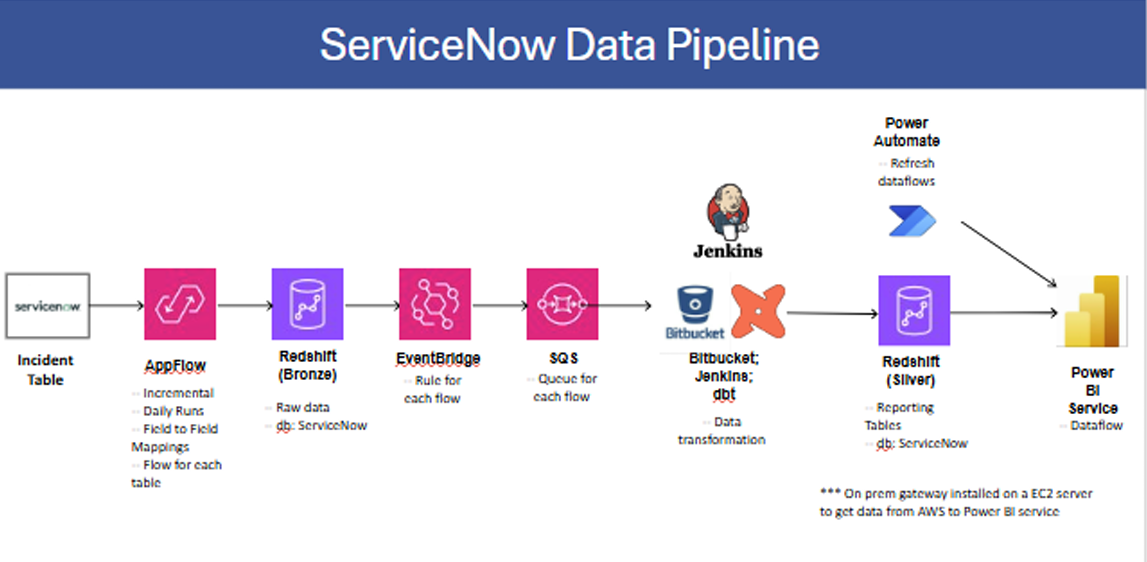
A nine-stage production data pipeline that moves ServiceNow ITSM data (Incidents, Change Requests, Problems, CMDB) into Microsoft Power BI for operational reporting. The pipeline follows a medallion architecture (Bronze → Silver layers) and is fully event-driven — each successful extraction automatically triggers transformation and report refresh with no manual intervention.
Pipeline Architecture
| Stage | Service | Role |
|---|---|---|
| 1 | ServiceNow REST API | Source system — table-level read via dedicated API service account |
| 2 | AWS AppFlow | Managed ETL connector; daily incremental extraction per table |
| 3 | Amazon Redshift (Bronze) | Raw landing zone — timestamped, unmodified source data |
| 4 | Amazon EventBridge | Event-driven trigger on AppFlow S3 success events |
| 5 | Amazon SQS | Message queue decoupling EventBridge from Jenkins |
| 6 | Jenkins + Bitbucket | CI/CD pipeline; polls SQS and executes DBT transformation jobs |
| 7 | Amazon Redshift (Silver) | Clean, modeled reporting layer managed by DBT |
| 8 | Microsoft Power Automate | HTTP-triggered dataset refresh orchestration |
| 9 | Microsoft Power BI Service | Semantic model, dashboards, and row-level security |
Data Extraction & Ingestion
AWS AppFlow acts as the managed ETL connector between ServiceNow and Redshift, abstracting API authentication, pagination, and incremental load logic. One AppFlow flow is created per source table for independent scheduling and targeted reruns. The incremental load strategy uses a watermark field (sys_updated_on) to extract only new or changed records, minimizing API quota consumption.
AppFlow stages data in S3 before Redshift ingestion. All records land in the Bronze schema (bronze.incident, bronze.change_request, etc.) with ingestion timestamps for lineage tracking and reprocessing support.
Transformation Layer
Jenkins polls SQS for flow-completion messages. On receipt, it pulls the latest DBT project from Bitbucket and executes the relevant DBT models against the Bronze schema. Transformed output is written to the Silver schema (silver.servicenow_incidents, etc.) — clean, typed, and joined to reference data.
DBT enforces data quality at run time using built-in tests (unique, not_null, accepted_values). On a successful DBT run, Jenkins sends an HTTP POST to a Power Automate webhook to trigger the Power BI dataset refresh, then deletes the SQS message.
Reporting & Access Control
Power BI Desktop connects to the Redshift Silver schema via JDBC/ODBC through an on-premises data gateway (hosted on an EC2 instance in the same VPC). Reports and semantic models are published to a shared Power BI workspace. Row-Level Security (RLS) roles are defined in Power BI Desktop and validated with the “View as role” feature before go-live, ensuring each team sees only their relevant data.
Key Design Decisions
- One flow per table — independent scheduling and error isolation; failures in one table do not cascade
- SQS as buffer — decouples EventBridge from Jenkins, guaranteeing delivery even during transient consumer downtime; Dead Letter Queue captures messages that exceed max receive count
- Least-privilege IAM — each stage uses a scoped service role (AppFlow role, DBT IAM user, M365 service account) with only the permissions required for that stage
- Private networking — Redshift clusters reside in a private subnet; the on-premises data gateway on EC2 allows Power BI Service to reach Silver without public cluster exposure
MelodyCraft
Autonomous pipeline to create song covers or voice-overs of any Youtube video using RVC v2 trained AI voices.
MelodyCraft AI
The Autonomous Pipeline
The autonomous pipeline of the AICoverGen application is primarily orchestrated through the main.py script. This script integrates various components and functionalities to successfully run the application. Here’s an overview of how the scripts work in conjunction:
- YouTube Video Processing and Downloading:
- The get_youtube_video_id function in main.py extracts the video ID from a YouTube URL.
- TThe yt_download function then downloads the audio from the YouTube video.
- Audio Processing:
- The preprocess_song function in main.py handles the preprocessing of the song. This includes downloading the song, converting it to stereo, and then seperating the vocals from the instrumentals using the MDX-Net model.
- Vocal Conversion:
- The voice_change function in main.py is used for converting the voice in the audio, utilizing the RVC model.
- Audio Effects and Mixing:
- The add_audio_effects function applies audio effects like reverb and compression.
- The combine_audio function then combines the AI vocals with the instrumental and backup vocals to produce the final audio output.
Scripts and Functions
General breakdown of each python script involved in the program purpose.
-
main.py: This script will handle the overall workflow. It will call functions from other scripts based on the input it receives (like a YouTube URL or a local audio file).
-
downloads_models.py: This script is designed to download specific machine learning models required by the AICoverGen application. It targets two types of models: MDX (Music Demixing) models and RVC (Robust Voice Conversion) models.
-
mdx.py: This script defines the core functionality for audio processing. It includes classes and methods for handling audio data, such as loading and processing audio files, performing Short-Time Fourier Transform (STFT) and its inverse, and managing the audio separation model.
-
rmvpe.py: This script is focused on implementing the vocal pitch estimation model. It defines various classes and methods that are essential for the model’s operation, including data preprocessing, neural network layers, and inference methods.
-
rvc.py: This script is responsible for configuring and executing a voice conversion process. It includes functions for loading models, setting up configurations, and running the voice conversion pipeline.
-
my_utils.py: This script contains utility functions that are used across the project. The functions contained include operations like audio processing, data manipulation, or other general-purpose tasks that support the main functionality of the application.
-
trainset_preprocess_pipeline_print.py: This script is designed for preprocessing audio data to prepare it for training machine learning models. It includes functions for slicing audio files, normalizing volume, and resampling. The script automates the process of converting large sets of audio data into a format suitable for training.
-
vc_infer_pipeline.py: This script is used for voice conversion, transforming the voice in an input audio file to sound like a different target voice using pre-trained models. It includes steps for audio processing, feature extraction, and the conversion process itself. The output is an audio file where the input voice has been modified to resemble the target voice.
-
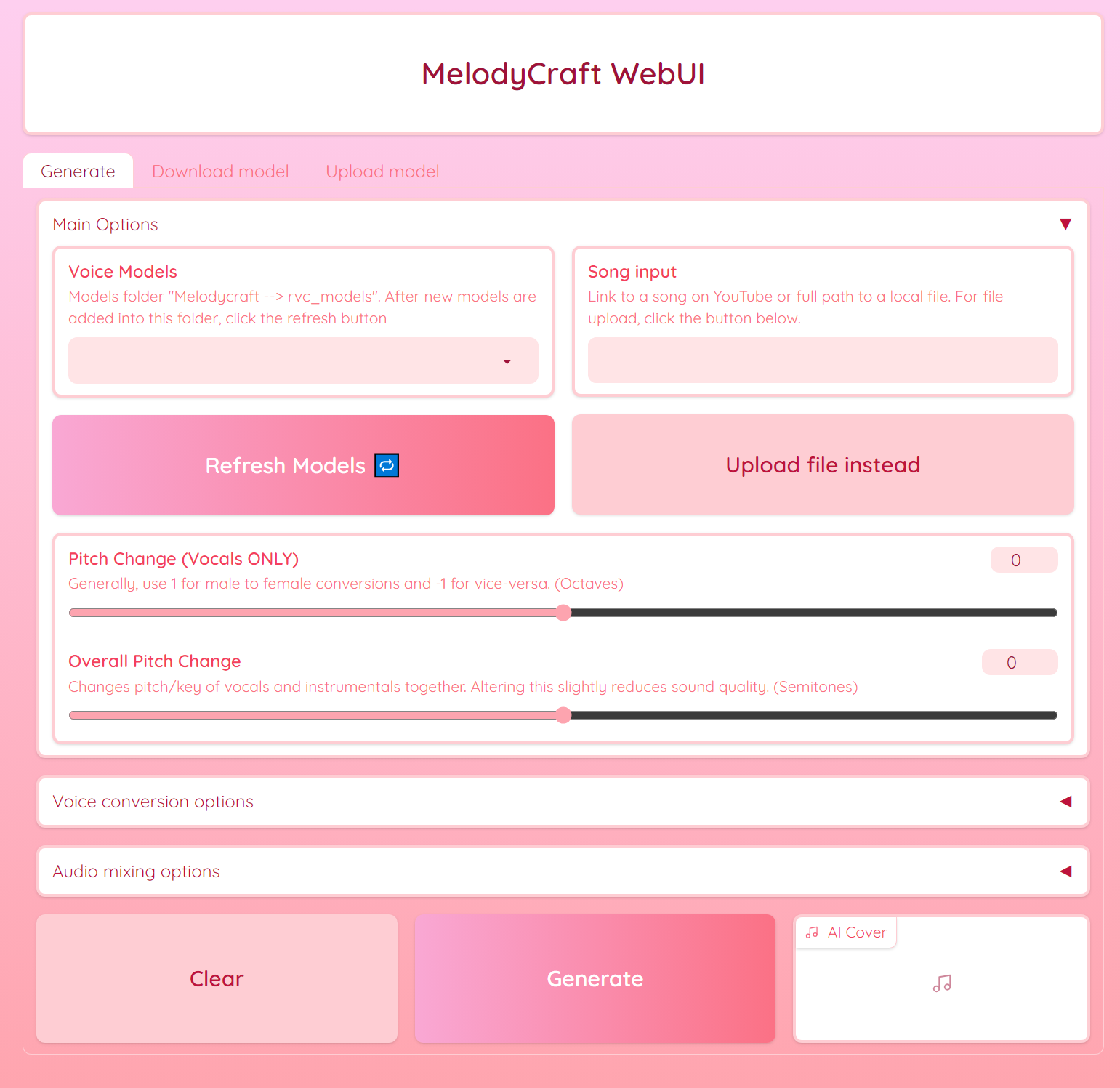
webui.py: This script will provide a user interface for the AI song cover generation application. Utilizes Gradioto python library to create an interactive web interface. This interface allows users to input song from Youtube, select voice models, and adjust various parameters like pitch and reverb for the AI-generated cover song. The script also includes features for downloading and uploading voice models, as well as filtering and selecting models based on user preferences.
Application UI